
FinanceWidget injects custom stylesheets into Google Finance, stripping away sidebars, headers, and AI recommendation panels. The result is a borderless WPF desktop container focused entirely on clean stock, crypto, and ETF graphs.
Windows Certificate Note: As a self-built project, Windows SmartScreen may trigger a warning. To launch, click "More Info" and select "Run Anyway". Requires WebView2 runtime.
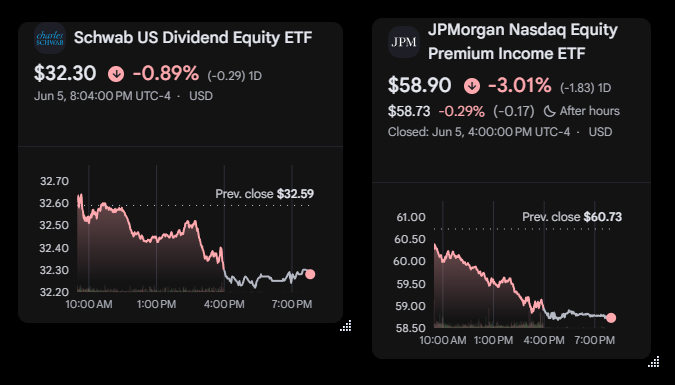
An overlay companion designed to sit quietly on secondary monitors or pinned on top, delivering pure market trends without the noise.
Spawn as many individual ticker widgets as you like. Freely drag edges or the bottom-right corner to resize, and the graph layout adjusts automatically.
Hide window title bars and drag borders globally from the tray menu for a completely clean, graph-only desktop view, while retaining full overlay interactivity.
Employs recursive Shadow DOM traversal and coordinate bounds detection on startup to automatically hide Google Finance checkmark/plus watchlist buttons completely.
Browse and add popular Stocks, Crypto, and ETFs from a curated lookup window, or quickly key in trackers using an entry prompt with suggested click suggestions.
Refined filters strip "Overview", "Financials", and AI recommendations, while startup interaction scripts automatically close and dismiss Google's persistent Beta notices.
Authenticate directly with your Google account in any widget via WebView2, check for new releases in-app, and view version release notes via context menus.
Get FinanceWidget running on your desktop in less than a minute.
Extract the downloaded ZIP archive and launch FinanceWidget.exe. If prompted by Windows SmartScreen, click "More info" and select "Run anyway".
The app sits quietly in your Windows System Tray (near the clock). Right-click the tray icon to trigger the context settings menu or click "Add New Widget".
Enter your desired ticker symbol. Drag individual widgets by their top border handles to arrange them across screens, drag corners to resize, or double-click the tray icon to foreground all trackers instantly!
FinanceWidget coordinates with Google Finance using the standard SYMBOL:EXCHANGE formatting.
To locate any quote's formatting, search for it on google.com/finance and inspect the browser address URL. The ticker symbol is the final path segment of the URL (e.g. .../quote/NVDA:NASDAQ maps to NVDA:NASDAQ).
FinanceWidget is built as an ultra-lightweight C# WPF desktop companion leveraging modern .NET 10 compilation profiles.
To build FinanceWidget as a self-contained, high-performance single file with ReadyToRun optimizations, execute the dotnet publish profile below inside your development environment:
Rather than utilizing external databases or remote clouds, FinanceWidget maintains absolute local privacy. Active tickers, coordinates, scales, and preferences are saved as serialized JSON in the local application data path: